Imii Audio by ゐみゐ開発部

Humanizer Pro Header

🚀 リリース記念セール開催中!
今だけ ¥980(通常¥1500)
※ macOS デスクトップ専用アプリ

※ macOS(Intel / Apple Silicon)対応。Windows版は今後対応予定。
ご購入前に必ず対応環境をご確認ください。

Humanizer Pro is a velocity refinement tool for keyboard and drum MIDI.

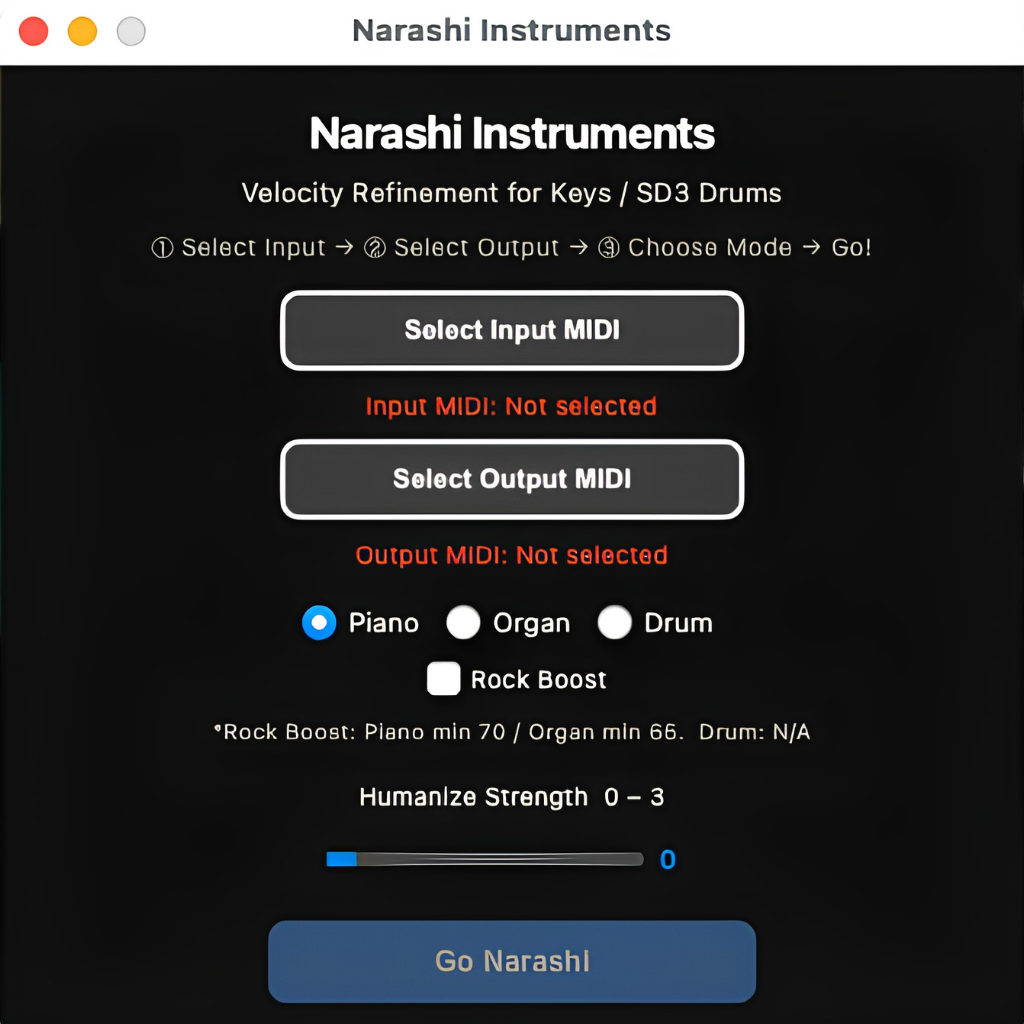
Humanizer Proのユーザーインターフェース画面。MIDIベロシティ調整の操作パネル。

Humanizer Proは、鍵盤・ドラムMIDI対応のベロシティ整音ツールです。
タイミングはそのままに、ベロシティのばらつきを自然に補正。
Piano / Organ / Drum の3モード対応で、Rock BoostとHumanize Strengthを搭載しています。

Humanizer Pro is a velocity refinement tool for keyboard and drum MIDI.
It keeps your timing intact while naturally smoothing out velocity imbalances.
Supports Piano, Organ, and Drum modes, with Rock Boost and Humanize Strength controls.

主な機能

✔ MIDIベロシティを自然に補正(±90 → ±15)
✔ タイミングはそのまま保持
✔ 電子ドラムやMIDI鍵盤に対応
✔ 3モード+追加機能(Piano / Organ / Drum + Rock Boost + Humanize Strength)
✔ ワンクリックで処理完了

Key Features

✔ Natural MIDI velocity optimization (±90 → ±15)
✔ Keeps timing intact
✔Compatible with e-drums and MIDI keyboards
✔ Three modes + extra features (Piano / Organ / Drum + Rock Boost + Humanize Strength)
✔ One-click processing


Q15. なぜHumanizer Proを開発したのですか?
A. MIDI編集の一番の悩みは「不自然なベロシティ」と「手作業のストレス」でした。そこで考えたのが、「MIDIにコンプレッサーをかける」という新発想。Humanizer Proは、従来のヒューマナイズを超え、自然な均し+弱音のアップワード補正をワンクリックで実現します。

Q15. Why was Humanizer Pro developed?
A. The biggest pain points in MIDI editing were “unnatural velocity” and “time-consuming manual tweaks.” We asked ourselves: What if we could apply a compressor to MIDI? Humanizer Pro goes beyond traditional humanize functions, delivering intelligent balancing plus upward compression for soft notes—all in one click.

Q4. Rock Boost機能とは何ですか?
A. Rock Boostは、小さいベロシティを持ち上げ、全体の迫力を増す機能です。ロックやポップスなど、ダイナミックなサウンドが求められるジャンルに最適です。

Q4. What is Rock Boost?
A. Raises softer notes to add punch and dynamic presence—ideal for rock, pop, or any genre needing extra energy.

Q6. Humanizer Proを使用すると、127のベロシティが下がるのはなぜ?
A. 127はMIDIでの理論上の最大値ですが、実際の楽器では“非常ベルを叩くような強打”に相当します。
Humanizer Proは自然な演奏感を保つため、極端な値を現実的な範囲に補正します。
その結果、コンプレッサーやEQが素直に効き、耳障りなピークを防げます。

Q6. Why were my 127 velocities reduced?
A. 127 is the theoretical MIDI max, but in reality, it’s like hitting an emergency alarm with full force. Humanizer Pro normalizes extreme values for natural playability, so compressors and EQ respond better.

Q5. Humanize Strength機能とは何ですか?
A. ベロシティの揺らぎを調整するスライダーです。数値を上げると揺らぎ成分が増し、より人間らしい演奏になります。

Q5. What is Humanize Strength?
A. Controls the amount of natural fluctuation in velocities. Higher values add more variation for a human-like feel.

※詳細なFAQはページの最後にあります。Full FAQ available at the bottom.


🚀 リリース記念セール開催中!
今だけ ¥980(通常¥1500)
※ macOS デスクトップ専用アプリ

※ macOS(Intel / Apple Silicon)対応。Windows版は今後対応予定。
ご購入前に必ず対応環境をご確認ください。

Narashi
Drum Velocity Refinement for SD3

🚀 リリース記念セール開催中!
今だけ ¥980(通常¥1500)
※ macOS デスクトップ専用アプリ

※ macOS(Intel / Apple Silicon)対応。Windows版は今後対応予定。
ご購入前に必ず対応環境をご確認ください。

Narashi MIDI Drum Velocity Optimization Tool for Superior Drummer 3

Narashiは、Superior Drummer 3専用のドラムMIDIベロシティ整音ツールです。
タイミングはそのままに、強打の暴れを抑えゴーストノートを活かし、
MIDIレベルでドラムのダイナミクスを自然に整えます。

Narashi is a drum MIDI velocity refinement tool optimized for Superior Drummer 3.
Without touching your timing, it tames harsh peaks, preserves ghost note nuances,
and shapes your drum dynamics naturally at the MIDI level.

主な機能

✔ MIDIベロシティを自然に整音(中心:約85に収束)
✔ タイミングは一切変更しない(ノート位置保持)
✔ ドラム専用設計(Kick / Snare / Hi-hat / Tom / Cymbal)
✔ 強打のピークを抑制(上限:約110)
✔ 弱打・ゴーストノートを保護(35〜60は最小変化に制限)
✔ ベロシティレンジを最適化(約35〜110に収束)
✔ 全トラック対応(ノート消失なし)
✔ ワンクリックで処理完了

Key Features

✔ Refines MIDI velocity naturally (centered around ~85)
✔ Preserves original timing (no note position changes)
✔ Drum-focused design (Kick / Snare / Hi-hat / Tom / Cymbal)
✔ Controls excessive peaks (ceiling around ~110)
✔ Preserves ghost notes (35–60 range with minimal adjustment)
✔ Optimizes overall velocity range (approximately 35–110)
✔ Processes all tracks safely (no note loss)
✔ One-click processing

Q1. タイミングは変わる?

A. 変わりません。

Q2. ノートは消える?

A. 消えません。

Q5. Micro Randomの役割?

A. 人間的揺れ付加(Ghostは除外)

Q7. SD3以外?

A. GM互換なら可(推奨はSD3)

Humanizer Keys
Velocity Refinement for Piano / Organ

🚀 リリース記念セール開催中!
今だけ ¥980(通常¥1500)
※ macOS デスクトップ専用アプリ

※ macOS(Intel / Apple Silicon)対応。Windows版は今後対応予定。
ご購入前に必ず対応環境をご確認ください。

Humanizer Keys Piano and Organ MIDI Velocity Refinement Tool

Humanizer Keysは、ピアノ / オルガン専用のベロシティ整音ツールです。
タイミングはそのままに、弱音を持ち上げ強音をやわらかく抑え、
中間ベロシティ(60〜90)を極力維持しながら、人間らしい演奏のニュアンスを整えます。

Humanizer Keys is a velocity refinement tool for piano and organ MIDI.
It preserves your timing, gently lifts soft notes, softly controls peaks,
and keeps mid-range velocities (60–90) intact — refining your performance without over-processing it.

主な機能

✔ピアノ / オルガン専用設計
✔タイミング補正なし(ベロシティのみ)
✔中間ベロシティ(60–90)を維持
✔極端なベロシティ差を自然に補正
✔Humanize Strength(0–3)
✔Rock Boost(低ベロシティ補強)

Key Features

✔Designed specifically for piano and organ

✔No timing adjustment (velocity only)

✔Preserves mid-range velocities (60–90)

✔Naturally corrects extreme velocity differences

✔Humanize Strength (0–3)

✔Rock Boost (low-velocity enhancement)

Q. タイミングは変わりますか?

A. 変わりません。ベロシティのみ処理します。

Q. なぜ必要ですか?

A. 強弱差を整理することで、コンプレッサーが自然に動作します。


Humanizer Pro v1.0 – README + FAQ

【日本語版】

■ 概要

MIDIベロシティ整音ツール「Humanizer Pro」
– コンプ前の新習慣。

Humanizer Proは、生演奏MIDI専用の整音ツールです。
Piano / Organ / Drum の3モードを搭載し、
演奏のタイミングはそのままに、ベロシティだけを自然に整えます。
電子ドラムやMIDIキーボードでの録音データに最適化されています。


■ 特徴

✔ ±90の乱れを±15に整音
✔ タイミングは変更しない(ベロシティのみ処理)
✔ 電子ドラム・MIDIキーボード録音データに最適化
✔ ワンクリックで簡単処理
✔ Rock Boost:小さいベロシティを補強し、パワフルなサウンドに
✔ Humanize Strength:数値を上げるとベロシティの揺らぎ成分が増します


■ 動作環境

対応OS:macOS(Intel / Apple Silicon)
※Windows版は今後対応予定


■ インストール方法

1. ZIPを解凍
2.「HumanizerPro.app」を任意の場所に移動
3. 初回起動時にセキュリティ警告が出た場合は、
「システム環境設定 > セキュリティとプライバシー」から許可を選択


■ 使い方

① アプリを起動
② 入力MIDIを選択(1つのMIDIトラックをお選びください)
③ 出力ファイルを指定
④ モード(Piano / Organ / Drum)を選択
⑤ 必要に応じて 「Rock Boost」 を有効化(Piano / Organのみ)
 → Rock Boost:小さいベロシティを補強し、よりパワフルなサウンドに
⑥ Humanize Strength を調整
 → 数値を上げるとベロシティの揺らぎ成分が増します
⑦ 「Go Humanizer」をクリック


■ Tips

💡 推奨ワークフロー

  1. MIDIを録音
  2. Humanizer Proでベロシティを整音
  3. オーディオ化(CPU負荷を軽減し、DAWを安定化)
  4. ゲインステージング(RMS基準で -18 dBにそろえる)
  5. コンプレッサーやEQで仕上げ

💡 ゲインステージングとは?
各トラックの音量を整え、プラグインやミックス全体が正しく動作するようにする作業です。
アナログモデリング系プラグインの多くは、0 VU ≒ -18 dBFS RMSを基準に設計されているため、オーディオ化後にRMSを -18 dB付近にそろえるのが理想です。
これにより、プラグインが自然に動作し、マスター段でのクリッピングも防げます。


■ 注意事項

・リージョンの先頭にノートを1つ追加する必要があります(Add one note at start)
・GM準拠のMIDIデータに最適化
・タイミング補正は行いません(ベロシティのみ処理)
・複数トラックを含むMIDIは非対応です(正しく処理されない場合があります)
 必ず1つのMIDIトラックをお選びください
・クラシックやジャズなど、演奏表現をそのまま残したい場合には不向きです
・電子ドラムのブランドによっては結果が異なる場合があります
※うまくいかない場合や疑問点がある場合は、サポートまで遠慮なくご相談ください


■ サポート

Imii Audio
Email: imii.nippon@gmail.com
Website: https://imii.seishiota.com/imii-audio/humanizer-pro/


FAQ(よくある質問)

Q1. なぜMIDIの先頭にノートを追加する必要がありますか?
A. 一部のDAWでは、最初にノートがないとテンポやタイミングが誤認識される場合があります。その結果、再生位置がズレることがあるため、先頭にノートを1つ追加することを推奨しています。

Q2. 複数トラックを一度に処理できますか?
A. できません。必ず1トラックずつ処理してください。

Q3. クラシックやジャズに向いていますか?
A. 演奏のニュアンスを忠実に残したいジャンル(クラシックやジャズなど)にはおすすめしません。Humanizer Proはベロシティを最適化し、演奏の揺れを自然に保ちながらバランスを整えることに特化しています。

Q4. Rock Boost機能とは何ですか?
A. Rock Boostは、小さいベロシティを持ち上げ、全体の迫力を増す機能です。ロックやポップスなど、ダイナミックなサウンドが求められるジャンルに最適です。

Q5. Humanize Strength機能とは何ですか?
A. ベロシティの揺らぎを調整するスライダーです。数値を上げると揺らぎ成分が増し、より人間らしい演奏になります。

Q6. Humanizer Proを使用すると、127のベロシティが下がるのはなぜ?
A. 127はMIDIでの理論上の最大値ですが、実際の楽器では“非常ベルを叩くような強打”に相当します。
Humanizer Proは自然な演奏感を保つため、極端な値を現実的な範囲に補正します。その結果、コンプレッサーやEQが素直に効き、耳障りなピークを防げます。

Q7. どのDAWで使えますか?
A. MIDIファイルの入出力に対応するDAWなら使用可能です。Logic Pro、Cubase、Studio One、Ableton Liveなどで問題なく利用できます。

Q8. 有料音源との相性は?
A. 一般的に良好です。特にアコースティック系や生感を重視した音源(例:Addictive Drums、Superior Drummer、Keyscapeなど)で自然な結果が得やすい傾向があります。

Q9. Windows版はありますか?
A. 現在はmacOS専用です。Windows対応版は今後開発予定です。

Q10. 音質に影響はありますか?
A. ありません。Humanizer Proはベロシティのみを処理し、タイミングやサウンドそのものには一切手を加えません。

Q11. 処理速度は遅いですか?
A. いいえ。通常、数秒で処理が完了します。

Q12. ファイルの長さは変わりますか?
A. 変わりません。タイミングは保持され、ノートの位置や長さはそのままです。

Q13. ファイルを元に戻せますか?
A. Humanizer Proは元のMIDIファイルを上書きしません。処理結果は新しいMIDIファイルとして保存されるため、オリジナルのデータは安全に保持されます。

Q14. DAWのヒューマナイズ機能と何が違いますか?
A. 多くのDAWに搭載されているヒューマナイズ機能は、ランダムな変化を与えるものです。一方、Humanizer Proは自然な均しを重視し、ベロシティをコンプレッサーのように整えることを目的としています。

Q15. なぜHumanizer Proを開発したのですか?
A. MIDI編集の一番の悩みは「不自然なベロシティ」と「手作業のストレス」でした。そこで考えたのが、「MIDIにコンプレッサーをかける」という新発想。
Humanizer Proは、従来のヒューマナイズを超え、自然な均し+弱音のアップワード補正をワンクリックで実現します。

Q16. 推奨ワークフローは?
A. 録音 → Humanizer Proで整音 → オーディオ化(CPU負荷を軽減し、DAWを安定化) → ゲインステージング(-18 dB RMS基準) → ミックス。
💡 ポイント
•Humanizer Proで整音後にオーディオ化すると安定。
•RMS -18dBでゲインステージング → プラグインが正しく動作。

Q17. なぜ-18 dB?
A. 多くのアナログモデリング系プラグインは「0 VU ≒ -18 dBFS RMS」を基準に設計。
この基準に揃えることで、コンプやサチュレーションが自然に動作し、ヘッドルームも確保できます。

Q18. MIDIをオーディオ化する必要はありますか?
A. 必須ではありませんが、推奨します。理由:
•CPU負荷を軽減(ソフト音源をリアルタイムで動かす必要がなくなる)
•音の再現性を保証(補正後のベロシティを含め、常に同じ音で再生できる)
•ミックス作業が楽になる(音量やエフェクトを、オーディオ波形を見ながら直感的に調整可能)
💡 ポイント
オーディオ化するとファイル容量は増えますが、処理が安定し、予期せぬ音変化等を防げます。


Humanizer Pro v1.0 – README + FAQ (English Version)

Overview

Humanizer Pro – A new step before compression.
Humanizer Pro is a velocity optimization tool for live-recorded MIDI.
It includes three modes—Piano, Organ, and Drum—and keeps timing intact while making note velocities sound natural.
Optimized for MIDI recorded from electronic drums and keyboards.


Features

✔ Reduces ±90 velocity variance to ±15
✔ Keeps timing unchanged (velocity only)
✔ Optimized for e-drums and MIDI keyboards
✔ One-click processing for fast results
✔ Rock Boost: Boosts softer notes for extra punch and dynamic clarity
✔ Humanize Strength: Adds natural velocity variation; higher values increase the effect


System Requirements

・macOS (Intel / Apple Silicon)
・Windows version coming soon


Installation

1. Unzip the downloaded file
2. Move HumanizerPro.app to any folder you like
3. If a security warning appears, allow via System Preferences → Security & Privacy


How to Use

① Launch the app
② Select the input MIDI file (single track)
③ Choose the output file
④ Select mode (Piano / Organ / Drum)
⑤ Optionally enable Rock Boost (Piano & Organ only)
⑥ Adjust Humanize Strength
⑦ Click Go Humanizer


Tips

💡 Recommended Workflow
Record → Optimize with Humanizer Pro → Bounce to audio (around -18 dB RMS) → Gain stage → Mix → Master

💡 Why -18 dB RMS?
Most analog-modeled plugins are calibrated for 0 VU ≈ -18 dBFS RMS.
Keeping this level ensures proper plugin behavior and sufficient headroom.


Notes

・Add one note at the beginning of the MIDI region (to prevent DAW misinterpretation)
・Optimized for GM-compliant MIDI data
・Does not alter timing (velocity only)
・Designed for single-track MIDI files. Please process one track at a time.
・Not recommended for genres where preserving every nuance is essential (e.g., classical, jazz)
・Results may vary depending on the electronic drum brand

If you encounter any issues or have questions, please contact our support team.


Support

Imii Audio
Email: imii.nippon@gmail.com
Website: https://imii.seishiota.com/imii-audio/humanizer-pro/


FAQ – Frequently Asked Questions

Q1. Why add a note at the start?
A. Some DAWs misinterpret tempo if no note exists at the beginning, causing playback issues.

Q2. Can I process multiple tracks?
A. No, please process one track at a time.

Q3. Is it good for classical or jazz?
A. Not recommended for genres where preserving every subtle nuance is essential.

Q4. What is Rock Boost?
A. Raises softer notes to add punch and dynamic presence—ideal for rock, pop, or any genre needing extra energy.

Q5. What is Humanize Strength?
A. Controls the amount of natural fluctuation in velocities. Higher values add more variation for a human-like feel.

Q6. Why reduce velocity 127?
A. Velocity 127 represents an extreme force—unrealistic for real instruments.
Humanizer Pro normalizes these values for natural playback, improves compressor behavior, and prevents harsh peaks.

Q7. Which DAWs work?
A. Any DAW that supports MIDI import/export. Tested with Logic Pro, Cubase, Studio One, and Ableton Live.

Q8. Compatible with premium sound libraries?
A. Yes, especially acoustic or realism-focused libraries such as Addictive Drums, Superior Drummer, and Keyscape.

Q9. Windows version?
A. Currently macOS only. A Windows version is planned.

Q10. Does it affect sound quality?
A. No, it only processes velocity, leaving timing and sound untouched.

Q11. Is the processing slow?
A. No, processing usually completes in seconds.

Q12. Does file length change?
A. No, note positions and timing remain exactly the same.

Q13. Can I restore the original file?
A. Yes. Humanizer Pro never overwrites your original file. It creates a new MIDI file instead.

Q14. Difference from DAW humanize?
A. Most DAWs apply random variations. Humanizer Pro focuses on natural leveling, working like a compressor for MIDI.

Q15. Why was it developed?
A. To address unnatural MIDI velocity and tedious manual editing by introducing a compressor-like approach for MIDI.

Q16. What is the recommended workflow?
A. Record → Humanizer Pro → Bounce to audio (target around -18 dB RMS) → Gain stage → Mix → Master.
💡 This ensures optimized velocity before audio conversion and proper plugin behavior during mixing.

Q17. Why -18 dB RMS?
A. Most analog-modeled plugins expect 0 VU ≈ -18 dBFS RMS, ensuring accurate response, proper dynamics, and sufficient headroom.

Q18. Do I need to bounce to audio?
A. Not required, but highly recommended because:

Makes mixing easier with visual waveforms for intuitive editing
💡 Tip:
Converting to audio slightly increases file size but improves session stability, prevents unexpected issues, and guarantees consistent results during mixing.

Reduces CPU load (no need for real-time instrument playback)

Ensures consistent playback after velocity optimization